Pulse
A weekly social performance report with editions, a timeline and SOMIN insight chains.
Make a Pulse for [brand] in my [workspace] workspace.
/marketing-mondays:somin-pulseFree plugin for Claude · Marketing Mondays
The workflow from our Monday session, packed as one plugin for Claude. Eight skills listen to your market, decode competitors, find the whitespace, make on-brand creative and ship a content calendar, all from your own SOMIN data.

Rated by users on G2 and Capterra
“I can run the whole strategy process in one conversation.”
“…a very strong customer success team, and the MCP server is very easy to use.”
“…very easy to generate intuitive, instructive reports on our social marketing campaigns…”
Short excerpts from validated reviews, quoted as written. Read every review in full on G2 and Capterra.
What's inside · one loop, five steps
Who are we talking to, what's bugging them, why does it happen, and what's the one line that says it? The plugin asks them every time, on your brand. Each step is a skill you can run on its own or chain into the next. Watch the real run from the session.
The eight main skills
Plus 18 helper skills the main ones call for you, from persona and tension discovery to whitespace analysis, content calendars and deck QA.
A weekly social performance report with editions, a timeline and SOMIN insight chains.
Make a Pulse for [brand] in my [workspace] workspace.
/marketing-mondays:somin-pulseKeywords, share of voice, audiences, pain points and the competitor content that performs best.
Using SOMIN, look at [workspace]: show what competitor content works.
/marketing-mondays:competitor-audience-content-analysisPersona, tension, angle and story chains, each backed by real posts.
Build an Insight Engine dashboard for [brand]'s latest study.
/marketing-mondays:somin-insight-engine-dashboardOne clickable landscape page: findings, brands, a recommendation and what to make.
Build a landscape breakdown for [brand] and its competitors for last month.
/marketing-mondays:somin-landscape-reportA multi-market dashboard of competitors' offers, discounts and product launches.
Track what competitors launched in each of our markets this year.
/marketing-mondays:competitor-product-market-insightsScores how varied a brand's creative is, from 0 to 100, against its competitors.
How varied is [brand]'s creative compared with its competitors?
/marketing-mondays:content-diversity-scorerA strategy briefing deck: whitespace, trends, insights, calendar and creatives.
Build a SOMIN briefing deck for [brand] in [market].
/marketing-mondays:somin-brand-deckFrom strategy to scored creatives in your Figma file, a calendar, Postly scheduling and PDFs.
Turn our SOMIN strategy into two weeks of posts and schedule them in Postly.
/marketing-mondays:somin-strategy-to-postlySet it up · about three minutes
One file brings everything: the 26 skills and the SOMIN connector they read your data through. You need Claude (the desktop app or claude.ai) and a SOMIN account; Figma and Postly are optional.
Sign in at cloud.somin.ai with the account whose workspaces Claude should see, then open claude.ai or the Claude desktop app. Claude links to whichever SOMIN account is signed in when you click Connect, so SOMIN always comes first.
Open Customize › Plugins, click Add › Upload plugin and choose marketing-mondays.plugin from your downloads. It appears under your plugins, switched on. The plugin already holds all 26 skills.
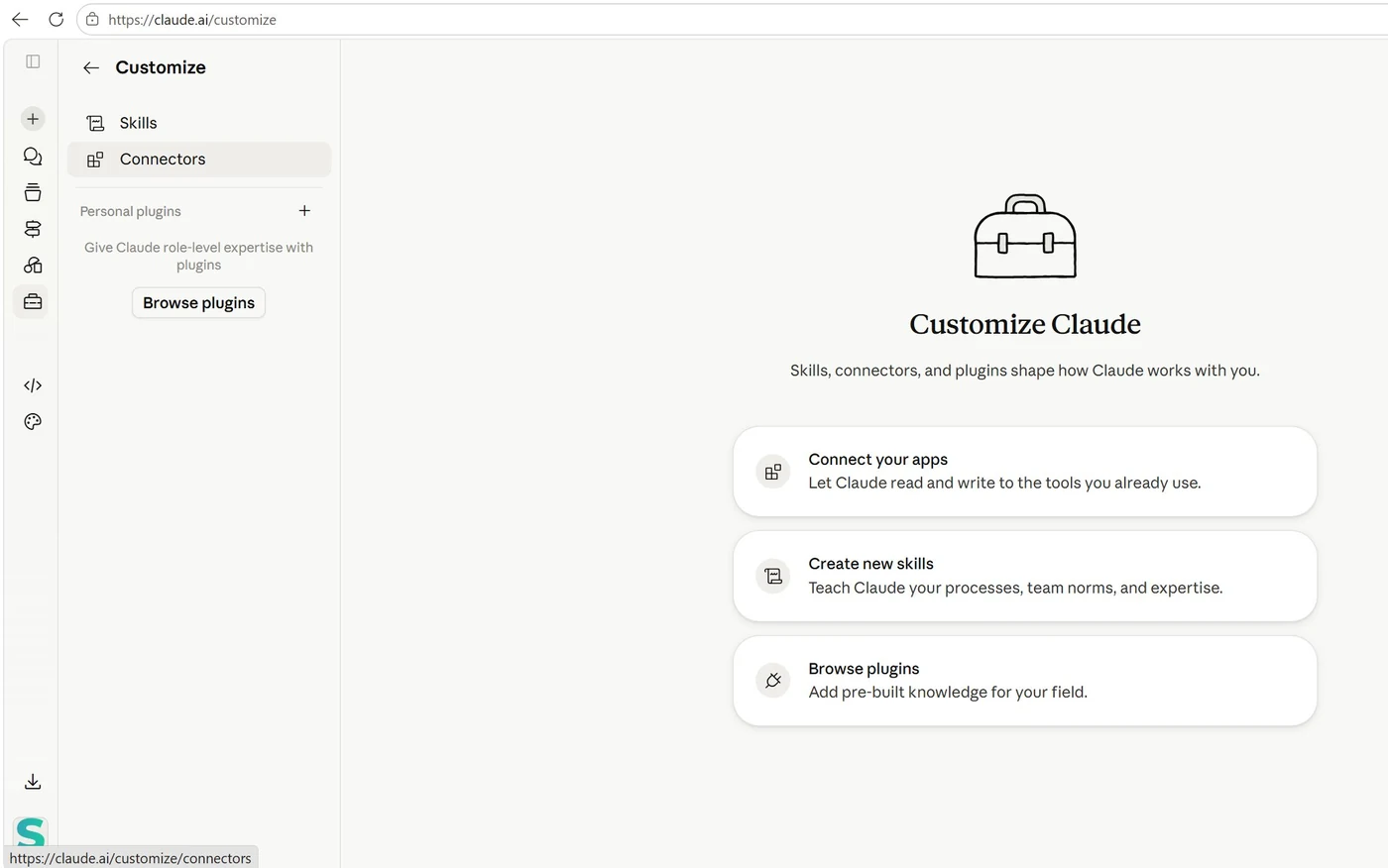
Open Marketing Mondays in Customize › Plugins and select its Connectors tab. If SOMIN shows "Not added", click Add, then Connect; if it shows "Not connected", click Connect. On a Team or Enterprise plan, ask your Claude Owner to add the SOMIN connector, then connect it with your own account.
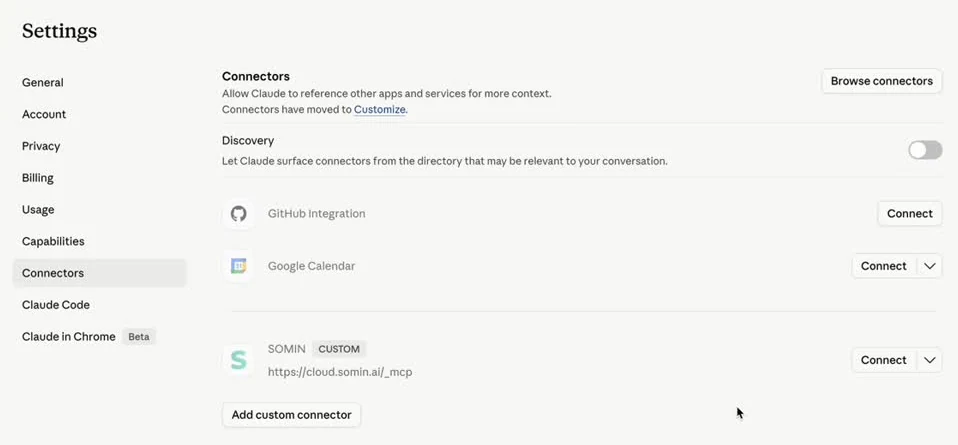
No Connectors tab? Add SOMIN as a custom connector instead, in Customize › Connectors › Add custom connector:
Keep the underscore (/_mcp, not /mcp), and use this route instead of the plugin's Connectors tab, not as well.
Ask Claude which SOMIN workspaces it can see. A list of workspace names within a few seconds means you are connected. Then try the full workflow:
You can also type / in the message box: the menu lists every skill with the plugin it came from.
Questions
Claude (claude.ai or the Claude desktop app) on a plan that lets you add plugins, and a SOMIN account. Figma and Postly are optional and only needed for the make and ship steps.
Yes. The plugin is free to download. Its skills read your data through SOMIN, so they need a SOMIN account to work on your own brand and competitors. Request SOMIN access.
Yes. A plugin added in the Claude app syncs to Claude Code signed in to the same account (run /reload-plugins), or run claude --plugin-dir ./marketing-mondays.zip for one session. Then run /mcp, pick SOMIN and sign in. Skills appear as /marketing-mondays:<skill>.
From your SOMIN workspaces: the competitor posts, ads, studies and audience insights SOMIN already tracks for you. Every number in the outputs traces back to a SOMIN post, study or ID.
A Singapore community of marketers that decodes one real market signal every Monday. SOMIN is its technology partner. The plugin packs the workflow shown live at the session The 2027 marketing team: smaller, faster, or obsolete? on 12 October 2026.
Peer-reviewed research
SOMIN's co-founder, Prof. Aleks Farseev, publishes research on audience profiling, personality-driven content and explainable AI for advertising at AAAI, ACM Multimedia, SIGIR, WSDM and The Web Conference. Those models run inside SOMIN, next to playbooks from marketers who work with brand and agency teams every day.
Free, today's eight skills, on your own SOMIN data. Prefer a guided setup? Book 30 minutes with the team.